Tax Reporting Software and Automation: How to Choose the Right Solution for Accurate, Efficient Tax Compliance
Managing tax obligations can be a demanding responsibility for businesses, particularly when financial records, tax calculations, reporting requirements and filing deadlines must be handled simultaneously. As businesses grow, the volume of financial transactions increases, making it more difficult to maintain accurate tax records and prepare reports manually. Without an organised system, businesses may experience calculation errors, missing documentation, delayed submissions and difficulties tracking their tax obligations.
This is where tax reporting software becomes valuable. Rather than depending entirely on spreadsheets, paperwork and manual calculations, businesses can use digital solutions to organise financial information, automate tax calculations, generate reports and improve their overall tax management processes.
In Nigeria, where businesses must comply with applicable federal and state tax requirements, having an effective reporting system can make a significant difference. Companies need reliable ways to monitor their tax responsibilities, maintain accurate records and prepare the necessary information for regulatory reporting.
Tax reporting automation also allows finance teams to spend less time performing repetitive administrative tasks and more time analysing financial information and making informed business decisions.
But how does tax reporting software work, what features should businesses look for, and how can organisations choose a solution that meets their needs? This article explores the benefits of automated tax reporting and explains how businesses can select the right software for efficient tax compliance.
How Tax Reporting Software Can Transform Your Business Tax Operations
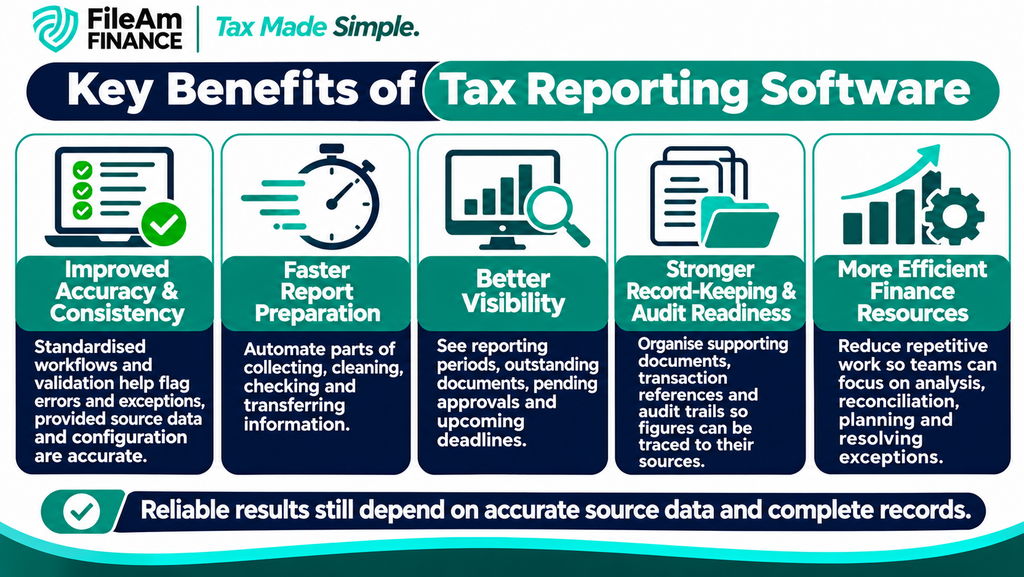
Managing tax obligations manually can slow down business operations, increase administrative costs and expose organisations to avoidable reporting errors. Investing in reliable tax reporting software gives businesses access to tools that simplify tax calculations, automate report generation, organise compliance records and improve financial visibility. By adopting an automated solution, companies can streamline their tax operations and manage reporting responsibilities more efficiently.
Why Businesses Need Automated Tax Reporting
Manual tax reporting can consume considerable time and resources. Finance professionals often have to gather information from different departments, check calculations, identify missing documents and prepare reports before filing deadlines.
These activities create opportunities for mistakes, particularly when businesses handle large volumes of financial information.
Automated tax reporting helps address these challenges in several ways.
1. Reduces Manual Errors
One of the major benefits of tax reporting software is its ability to reduce errors associated with repetitive calculations and manual data entry.
When tax reports are prepared manually, even a small mistake can affect the accuracy of financial records. An incorrect figure, duplicated transaction or missing entry may lead to inaccurate tax calculations.
Automation helps minimise these risks by applying configured calculations consistently and using structured financial information.
For instance, a business that processes multiple supplier invoices may need to identify transactions subject to withholding tax. Instead of manually reviewing every invoice, an appropriately configured system can help identify relevant transactions and calculate the applicable amounts.
However, automated calculations still require proper configuration and human verification.
2. Saves Time and Improves Productivity
Preparing tax reports manually can take hours or even days, depending on the size of the organisation.
Finance teams may spend significant time transferring information between spreadsheets, checking figures and preparing summaries for management.
Tax reporting automation reduces the amount of repetitive work involved in these processes.
With the right software, businesses can retrieve relevant financial information, generate reports and organise supporting documents more efficiently.
This gives accountants and finance professionals more time to focus on financial analysis, strategic planning and other important responsibilities.
3. Improves Financial Recordkeeping
Accurate tax reporting depends on reliable financial records.
Businesses need to maintain information such as invoices, receipts, payment records, expense statements and tax calculations. When these documents are stored across different folders, emails and spreadsheets, retrieving them can become difficult.
Tax reporting software can provide a centralised environment for organising relevant information.
This makes it easier to retrieve documents when preparing reports, conducting internal reviews or responding to tax authority enquiries.
4. Supports Timely Tax Reporting
Missing tax deadlines can expose businesses to applicable penalties, interest and compliance difficulties.
A reliable tax reporting system can help finance teams monitor important dates, track outstanding tasks and organise reporting activities.
Some solutions also provide automated reminders and notifications to alert users when reporting deadlines are approaching.
Although reminders do not replace proper tax planning, they can help businesses maintain better control over their responsibilities.
Important Features to Look for in Tax Reporting Software
Choosing tax reporting software requires more than selecting a platform that promises to automate calculations. Businesses should evaluate whether the solution can support their financial processes, reporting requirements and compliance responsibilities.
Here are some important features to consider.
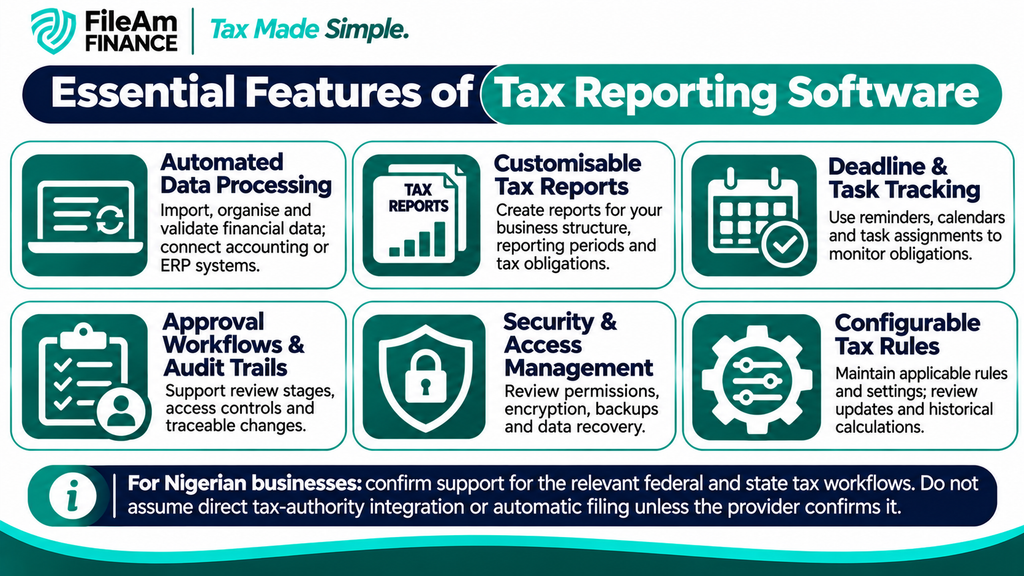
1. Automated Tax Calculations
A good tax reporting solution should support accurate tax calculations based on relevant tax rules and properly configured financial information.
This feature reduces the need for employees to calculate every tax obligation manually.
For businesses operating in Nigeria, the software should be capable of supporting relevant tax categories and applicable rules, depending on the organisation’s operations.
These may include:
- Company income tax.
- Value Added Tax (VAT).
- Withholding Tax (WHT).
- Pay-As-You-Earn (PAYE).
- Other applicable state and federal tax obligations.
Businesses should confirm that the software reflects current legislation and can be updated when tax regulations change.
2. Customisable Tax Reports
Different organisations have different reporting requirements.
A manufacturing company may need reports covering supplier transactions, production expenses and operating costs, while a professional services firm may prioritise income records, client payments and withholding tax deductions.
Tax reporting software should allow users to generate reports that reflect their operational needs.
Useful reporting capabilities include transaction summaries, tax liability reports, payment records, deduction reports and period-based financial summaries.
Customisable reporting makes it easier for management and finance teams to understand their tax positions.
3. Document Management
Tax reporting involves more than calculating figures. Businesses must also maintain supporting documents that explain and substantiate the information contained in their reports.
A software solution with document management capabilities can help organise invoices, receipts, tax schedules and other relevant records.
This reduces the possibility of losing important information and makes documentation easier to retrieve when required.
4. Integration with Accounting Systems
Businesses often use accounting software, payroll platforms, enterprise resource planning systems and payment applications to manage different financial activities.
When these systems operate independently, finance teams may have to transfer information manually.
Tax reporting software that integrates with existing accounting systems can reduce unnecessary duplication.
For example, information recorded in an accounting platform may be transferred into a tax reporting system, allowing finance professionals to work with more consistent financial data.
Before purchasing a solution, businesses should confirm which integrations are supported and whether additional configuration is required.
5. User Access and Approval Workflows
Tax reporting often involves several people.
An accountant may prepare a report, a finance manager may review the calculations, and a senior officer may approve the final submission.
Software with user permissions and approval workflows can help establish clear responsibilities.
It also creates a more organised review process by ensuring that reports are checked before they are finalised.
6. Data Security and Audit Trails
Tax records contain sensitive financial information that must be protected.
Businesses should prioritise software that offers appropriate security features, including access controls, data encryption, secure backups and activity tracking.
Audit trails are particularly important because they help organisations identify who accessed or modified information and when changes occurred.
These records support accountability and make internal reviews more effective.
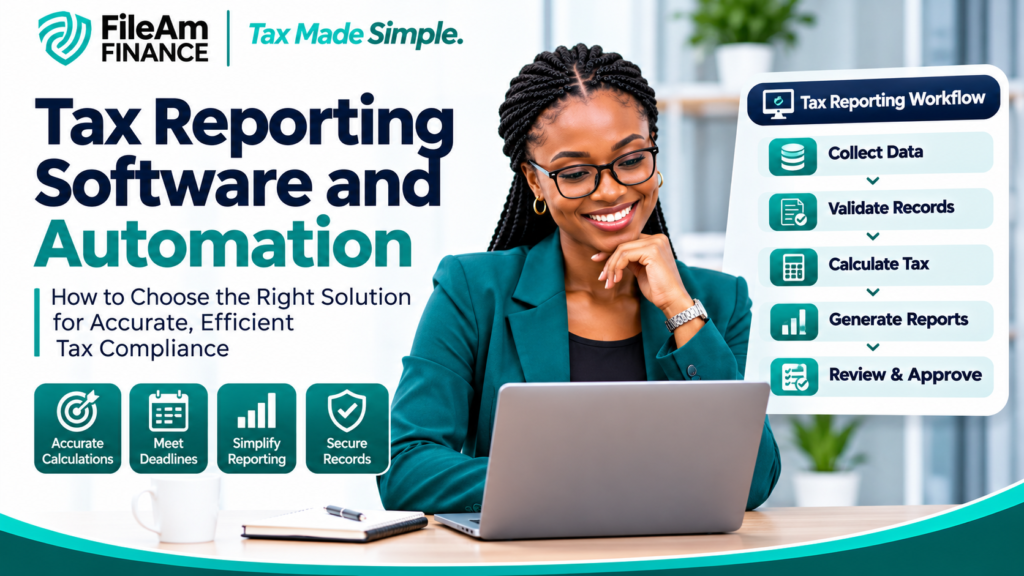
How Tax Reporting Automation Works
Tax reporting automation involves using technology to simplify different stages of the reporting process.
Although the exact workflow depends on the software, most systems follow a similar structure.
Step 1: Financial data collection
The process begins with gathering relevant financial information from accounting systems, payroll records, invoices, receipts and other sources.
Step 2: Data organisation
The software organises the information into appropriate categories, making it easier to identify taxable transactions, expenses, deductions and payments.
Step 3: Tax calculations
Configured tax rules are applied to the relevant financial information to calculate applicable tax liabilities.
Step 4: Report generation
The system generates reports showing relevant financial and tax information. These reports can be reviewed by accountants and other authorised personnel.
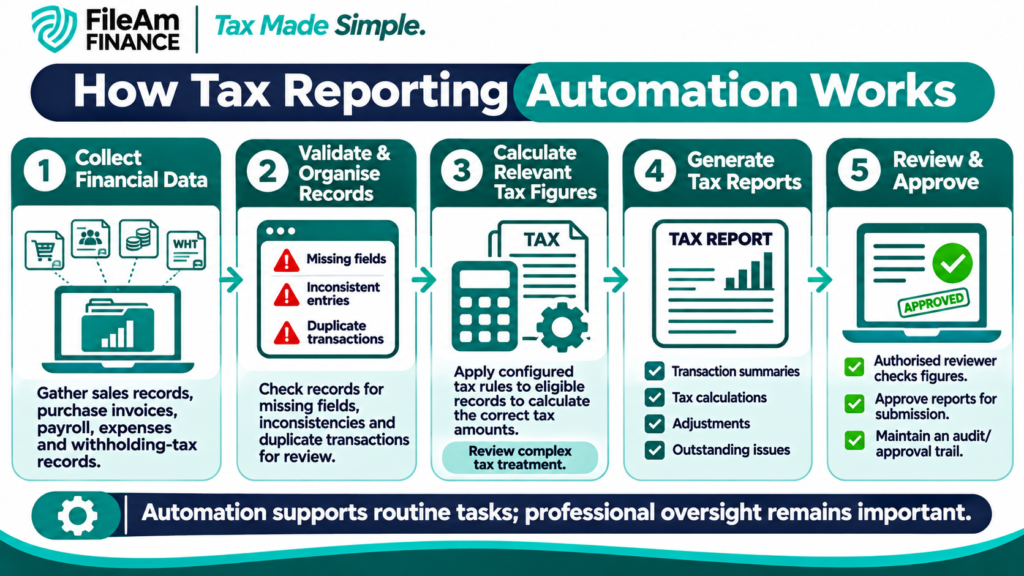
Step 5: Review and approval
Finance professionals examine the generated reports, verify the calculations and correct any identified discrepancies.
Step 6: Filing and recordkeeping
Once approved, the relevant information can be used to support tax filing and payment processes through the appropriate channels. Supporting documents and reports are retained for future reference.
This structured approach makes tax reporting more organised and reduces the amount of repetitive administrative work.
Practical Example: How a Business Can Use Tax Reporting Software
Consider a Nigerian company that distributes household products to retailers across different states.
The company processes hundreds of sales transactions, purchases inventory from suppliers and employs several workers. Its finance department is responsible for maintaining financial records, reviewing applicable taxes and preparing periodic reports.
Previously, the accounting team used spreadsheets to calculate taxes and organise supporting documents.
Every reporting period, employees had to collect invoices, review transactions, calculate relevant tax amounts and prepare summaries for management.
This approach created several challenges:
- Some invoices were missing from the reporting records.
- Employees occasionally entered incorrect figures.
- Preparing reports consumed too much time.
- Management struggled to obtain updated tax information.
- Reviewing previous transactions was difficult.
After implementing suitable tax reporting software, the company established a more organised reporting process.
Sales and purchase information could be retrieved from its accounting system, while the tax software helped categorise transactions and apply configured tax calculations.
The finance team could generate reports showing relevant tax information, review outstanding obligations and organise supporting documents.
The company also introduced an approval process that required the finance manager to review reports before they were finalised.
As a result, employees spent less time transferring figures manually and had better visibility into the company’s tax records.
The software did not eliminate the need for professional review, but it improved the organisation’s reporting process and helped the company identify discrepancies earlier.
This example demonstrates how automation can support better tax management without removing human responsibility.
inesses must comply with applicable federal and state tax requirements, having an effective reporting system can make a significant difference. Companies need reliable ways to monitor their tax responsibilities, maintain accurate records and prepare the necessary information for regulatory reporting.
Tax reporting automation also allows finance teams to spend less time performing repetitive administrative tasks and more time analysing financial information and making informed business decisions.
But how does tax reporting software work, what features should businesses look for, and how can organisations choose a solution that meets their needs? This article explores the benefits of automated tax reporting and explains how businesses can select the right software for efficient tax compliance.
How Tax Reporting Software Can Transform Your business
Tax reporting software is a digital solution designed to help businesses organise, calculate, prepare and manage tax-related financial information. It simplifies the process of collecting financial data, identifying relevant tax obligations and generating reports needed for internal reviews and regulatory compliance.
Traditionally, businesses relied on accountants and finance teams to collect transaction records, calculate tax liabilities, reconcile financial statements and prepare reports manually. Although these processes can work for smaller organisations, they become increasingly complicated as transaction volumes and reporting requirements grow.
Tax reporting software provides a more structured approach by bringing relevant financial information together in one system.
Depending on its capabilities, the software may support:
- Automated tax calculations based on configured rules.
- Preparation of tax reports and financial summaries.
- Organisation and storage of tax-related documents.
- Tracking of tax obligations and reporting deadlines.
- Reconciliation of financial records.
- Review and approval of tax reports.
- Monitoring of outstanding tax responsibilities.
- Exporting reports for accounting and compliance purposes.
For example, a company processing hundreds of transactions monthly may struggle to calculate applicable taxes and prepare reports using spreadsheets alone. With an appropriate software solution, financial information can be organised systematically, reducing repetitive work and making the reporting process easier to manage.
It is important to understand that tax reporting software does not automatically guarantee compliance. Businesses must ensure that the system reflects applicable tax laws, uses accurate financial information and is regularly reviewed by qualified personnel.
Why Businesses Need Automated Tax Reporting
Manual tax reporting can consume considerable time and resources. Finance professionals often have to gather information from different departments, check calculations, identify missing documents and prepare reports before filing deadlines.
These activities create opportunities for mistakes, particularly when businesses handle large volumes of financial information.
Automated tax reporting helps address these challenges in several ways.
1. Reduces Manual Errors
One of the major benefits of tax reporting software is its ability to reduce errors associated with repetitive calculations and manual data entry.
When tax reports are prepared manually, even a small mistake can affect the accuracy of financial records. An incorrect figure, duplicated transaction or missing entry may lead to inaccurate tax calculations.
Automation helps minimise these risks by applying configured calculations consistently and using structured financial information.
For instance, a business that processes multiple supplier invoices may need to identify transactions subject to withholding tax. Instead of manually reviewing every invoice, an appropriately configured system can help identify relevant transactions and calculate the applicable amounts.
However, automated calculations still require proper configuration and human verification.
2. Saves Time and Improves Productivity
Preparing tax reports manually can take hours or even days, depending on the size of the organisation.
Finance teams may spend significant time transferring information between spreadsheets, checking figures and preparing summaries for management.
Tax reporting automation reduces the amount of repetitive work involved in these processes.
With the right software, businesses can retrieve relevant financial information, generate reports and organise supporting documents more efficiently.
This gives accountants and finance professionals more time to focus on financial analysis, strategic planning and other important responsibilities.
3. Improves Financial Recordkeeping
Accurate tax reporting depends on reliable financial records.
Businesses need to maintain information such as invoices, receipts, payment records, expense statements and tax calculations. When these documents are stored across different folders, emails and spreadsheets, retrieving them can become difficult.
Tax reporting software can provide a centralised environment for organising relevant information.
This makes it easier to retrieve documents when preparing reports, conducting internal reviews or responding to tax authority enquiries.
4. Supports Timely Tax Reporting
Missing tax deadlines can expose businesses to applicable penalties, interest and compliance difficulties.
A reliable tax reporting system can help finance teams monitor important dates, track outstanding tasks and organise reporting activities.
Some solutions also provide automated reminders and notifications to alert users when reporting deadlines are approaching.
Although reminders do not replace proper tax planning, they can help businesses maintain better control over their responsibilities.
Important Features to Look for in Tax Reporting Software
Choosing tax reporting software requires more than selecting a platform that promises to automate calculations. Businesses should evaluate whether the solution can support their financial processes, reporting requirements and compliance responsibilities.
Here are some important features to consider.
1. Automated Tax Calculations
A good tax reporting solution should support accurate tax calculations based on relevant tax rules and properly configured financial information.
This feature reduces the need for employees to calculate every tax obligation manually.
For businesses operating in Nigeria, the software should be capable of supporting relevant tax categories and applicable rules, depending on the organisation’s operations.
These may include:
- Company income tax.
- Value Added Tax (VAT).
- Withholding Tax (WHT).
- Pay-As-You-Earn (PAYE).
- Other applicable state and federal tax obligations.
Businesses should confirm that the software reflects current legislation and can be updated when tax regulations change.
2. Customisable Tax Reports
Different organisations have different reporting requirements.
A manufacturing company may need reports covering supplier transactions, production expenses and operating costs, while a professional services firm may prioritise income records, client payments and withholding tax deductions.
Tax reporting software should allow users to generate reports that reflect their operational needs.
Useful reporting capabilities include transaction summaries, tax liability reports, payment records, deduction reports and period-based financial summaries.
Customisable reporting makes it easier for management and finance teams to understand their tax positions.
3. Document Management
Tax reporting involves more than calculating figures. Businesses must also maintain supporting documents that explain and substantiate the information contained in their reports.
A software solution with document management capabilities can help organise invoices, receipts, tax schedules and other relevant records.
This reduces the possibility of losing important information and makes documentation easier to retrieve when required.
4. Integration with Accounting Systems
Businesses often use accounting software, payroll platforms, enterprise resource planning systems and payment applications to manage different financial activities.
When these systems operate independently, finance teams may have to transfer information manually.
Tax reporting software that integrates with existing accounting systems can reduce unnecessary duplication.
For example, information recorded in an accounting platform may be transferred into a tax reporting system, allowing finance professionals to work with more consistent financial data.
Before purchasing a solution, businesses should confirm which integrations are supported and whether additional configuration is required.
5. User Access and Approval Workflows
Tax reporting often involves several people.
An accountant may prepare a report, a finance manager may review the calculations, and a senior officer may approve the final submission.
Software with user permissions and approval workflows can help establish clear responsibilities.
It also creates a more organised review process by ensuring that reports are checked before they are finalised.
6. Data Security and Audit Trails
Tax records contain sensitive financial information that must be protected.
Businesses should prioritise software that offers appropriate security features, including access controls, data encryption, secure backups and activity tracking.
Audit trails are particularly important because they help organisations identify who accessed or modified information and when changes occurred.
These records support accountability and make internal reviews more effective.
How Tax Reporting Automation Works
Tax reporting automation involves using technology to simplify different stages of the reporting process.
Although the exact workflow depends on the software, most systems follow a similar structure.
Step 1: Financial data collection
The process begins with gathering relevant financial information from accounting systems, payroll records, invoices, receipts and other sources.
Step 2: Data organisation
The software organises the information into appropriate categories, making it easier to identify taxable transactions, expenses, deductions and payments.
Step 3: Tax calculations
Configured tax rules are applied to the relevant financial information to calculate applicable tax liabilities.
Step 4: Report generation
The system generates reports showing relevant financial and tax information. These reports can be reviewed by accountants and other authorised personnel.
Step 5: Review and approval
Finance professionals examine the generated reports, verify the calculations and correct any identified discrepancies.
Step 6: Filing and recordkeeping
Once approved, the relevant information can be used to support tax filing and payment processes through the appropriate channels. Supporting documents and reports are retained for future reference.
This structured approach makes tax reporting more organised and reduces the amount of repetitive administrative work.
Practical Example: How a Business Can Use Tax Reporting Software
Consider a Nigerian company that distributes household products to retailers across different states.
The company processes hundreds of sales transactions, purchases inventory from suppliers and employs several workers. Its finance department is responsible for maintaining financial records, reviewing applicable taxes and preparing periodic reports.
Previously, the accounting team used spreadsheets to calculate taxes and organise supporting documents.
Every reporting period, employees had to collect invoices, review transactions, calculate relevant tax amounts and prepare summaries for management.
This approach created several challenges:
- Some invoices were missing from the reporting records.
- Employees occasionally entered incorrect figures.
- Preparing reports consumed too much time.
- Management struggled to obtain updated tax information.
- Reviewing previous transactions was difficult.
After implementing suitable tax reporting software, the company established a more organised reporting process.
Sales and purchase information could be retrieved from its accounting system, while the tax software helped categorise transactions and apply configured tax calculations.
The finance team could generate reports showing relevant tax information, review outstanding obligations and organise supporting documents.
The company also introduced an approval process that required the finance manager to review reports before they were finalised.
As a result, employees spent less time transferring figures manually and had better visibility into the company’s tax records.
The software did not eliminate the need for professional review, but it improved the organisation’s reporting process and helped the company identify discrepancies earlier.
This example demonstrates how automation can support better tax management without removing human responsibility.
Tax Reporting Challenges That Software Can Help Businesses Overcome
Despite the benefits of automation, businesses may encounter several difficulties when managing their tax reporting processes.
Disorganised Financial Information
When financial records are stored in different systems, preparing reports becomes unnecessarily complicated.
Tax reporting software can help centralise relevant information and establish a consistent approach to recordkeeping.
Changing Tax Regulations
Tax laws and administrative requirements may change, making it necessary for businesses to review their reporting processes regularly.
A reliable software provider should offer updates and explain how regulatory changes affect the platform.
However, businesses should still verify the applicable requirements with qualified tax professionals and relevant authorities.
Limited Reporting Visibility
When reports are prepared manually, management may not have immediate access to updated tax information.
Automated reporting tools can provide clearer summaries and help decision-makers monitor financial obligations.
Difficulties During Tax Audits
Locating historical tax documents can be stressful when records are incomplete or poorly organised.
A centralised reporting system with searchable documents and audit trails can make it easier to retrieve supporting information.
How to Choose the Right Tax Reporting Software for Your Business
Selecting the right solution requires understanding your organisation’s reporting needs.
Rather than purchasing software simply because it offers multiple features, businesses should evaluate how effectively it addresses their
How to Choose the Right Tax Reporting Software for Your Business
Selecting the right solution requires understanding your organisation’s reporting needs.
Rather than purchasing software simply because it offers multiple features, businesses should evaluate how effectively it addresses their existing challenges.
Consider the following factors.
1. Understand your tax reporting requirements
Identify the types of taxes your business handles, the frequency of reporting and the documents required to support compliance.
This helps you determine which software capabilities are essential.
2. Evaluate automation capabilities
Look for solutions that can simplify data collection, calculations, report generation and document management.
The objective is to reduce repetitive work without compromising accuracy.
3. Consider ease of use
Software should be straightforward enough for employees to navigate without extensive technical knowledge.
An unnecessarily complicated platform may reduce adoption and create additional administrative challenges.
4. Check integration options
Determine whether the software can connect with your existing accounting, payroll and financial management systems.
Effective integration can reduce duplicate data entry and improve consistency.
5. Review security features
Ask about data protection, user permissions, encryption, backups and audit trails.
These features are essential when handling confidential financial information.
6. Compare pricing and scalability
Businesses should consider subscription fees, implementation costs, training expenses and additional charges for advanced features.
A suitable solution should accommodate the organisation’s current requirements while allowing it to grow.
7. Evaluate customer support
Reliable technical support is important, particularly when employees encounter difficulties during important reporting periods.
Check whether the provider offers onboarding, training, troubleshooting and regular software updates.
Why Nigerian Businesses Should Consider Tax Reporting Solutions
The Nigerian business environment requires organisations to pay attention to their tax responsibilities while maintaining accurate financial records.
With the introduction of Nigeria’s new tax reform framework, effective from January 2026, businesses need to pay particular attention to applicable changes in tax administration, compliance and reporting.
Companies must understand how relevant requirements affect their operations and ensure that their financial processes remain aligned with current legislation.
For small and medium-sized enterprises, this can be challenging because they may not have large finance departments or dedicated tax specialists.
Tax reporting software can help simplify the administrative side of compliance by providing structured recordkeeping, automated calculations and organised reporting.
It can also support growing businesses that need to manage increasing transaction volumes without continually expanding their administrative workload.
However, businesses should avoid assuming that every software platform automatically supports Nigerian tax requirements. Before subscribing, they should confirm that the solution is suitable for their industry, applicable tax obligations and relevant regulatory processes.
Common Mistakes to Avoid When Implementing Tax Reporting Software
Although automation can improve tax reporting, poor implementation may limit its effectiveness.
Businesses should avoid the following mistakes:
- Ignoring data accuracy: Incorrect financial information will produce unreliable reports, even when the software performs calculations automatically.
- Failing to update tax rules: Software configurations must reflect applicable changes in tax legislation.
- Choosing software based on price alone: An inexpensive platform may lack essential reporting, security or integration capabilities.
- Neglecting employee training: Employees must understand how to use the system and interpret generated reports.
- Overlooking professional reviews: Automated reports should be checked by qualified personnel before relevant filing or payment decisions are made.
- Failing to maintain backups: Businesses should ensure that important financial records remain protected and accessible.
Successful implementation requires a combination of appropriate technology, reliable financial information and effective internal controls.
Conclusion: Improve Your Tax Reporting Process with the Right Software
Tax reporting is an important part of financial management, but it does not have to involve endless spreadsheets, repetitive calculations and disorganised documentation.
With the right tax reporting software, businesses can simplify financial data collection, automate relevant calculations, generate reports and maintain better control over their tax records.
Automation also improves productivity by allowing finance teams to spend less time on administrative tasks and more time reviewing financial information, identifying risks and supporting business decisions.
For Nigerian businesses, choosing a solution that reflects applicable tax requirements, supports accurate reporting and offers reliable security is particularly important.
If your organisation still depends heavily on manual tax reporting processes, this may be the right time to consider a more structured approach.
Explore tax reporting software that helps your business automate tax operations, organise financial records and manage compliance more efficiently. Evaluate the available features, compare solutions and choose a platform that supports your business’s current needs and future growth.