How to Build an Effective Tax Compliance Workflow for Your Business
Managing business taxes is more than calculating how much tax is due and paying it before a deadline. For many businesses, tax compliance involves several moving parts: keeping accurate records, tracking filing dates, reviewing transactions, preparing returns, making payments, and maintaining supporting documents.
Without a structured system, these activities can become difficult to manage, especially as a business grows. A missed deadline, incorrect calculation, incomplete record, or forgotten filing can create unnecessary costs and compliance risks.
This is where a tax compliance workflow becomes useful. Instead of treating tax obligations as occasional administrative tasks, a business can create a repeatable process that clearly defines what needs to be done, who is responsible, when it should happen, and how completion should be verified.
In this guide, we explore how to build an effective tax compliance workflow, the role of tax workflow management, and how businesses can use technology to make the tax compliance process more organised.
What Is a Tax Compliance Workflow?
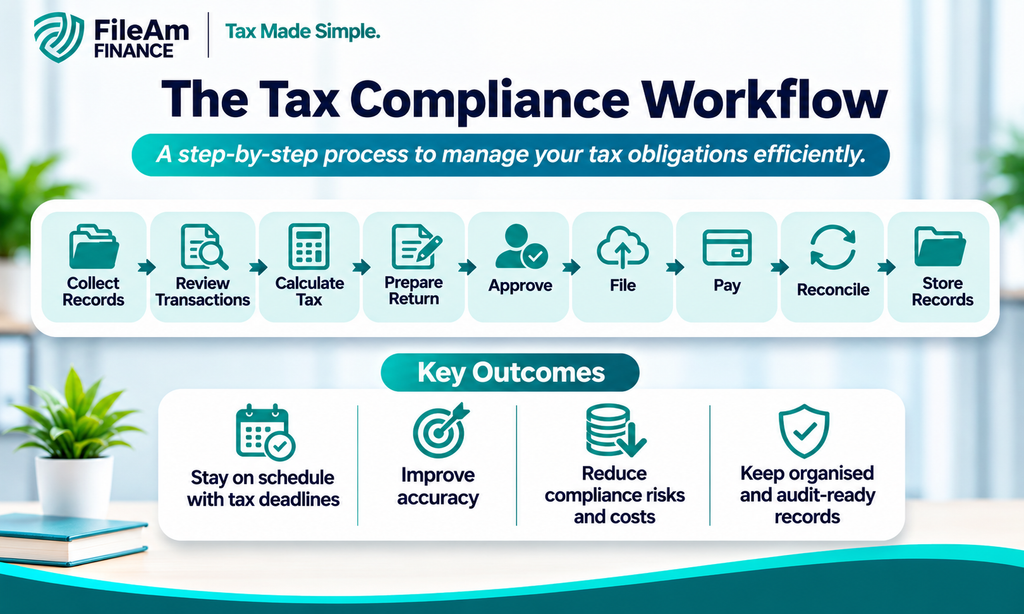
A tax compliance workflow is a structured sequence of activities a business follows to meet its tax obligations accurately and on time.
It typically covers the entire process, from collecting financial information to filing tax returns and storing evidence of compliance.
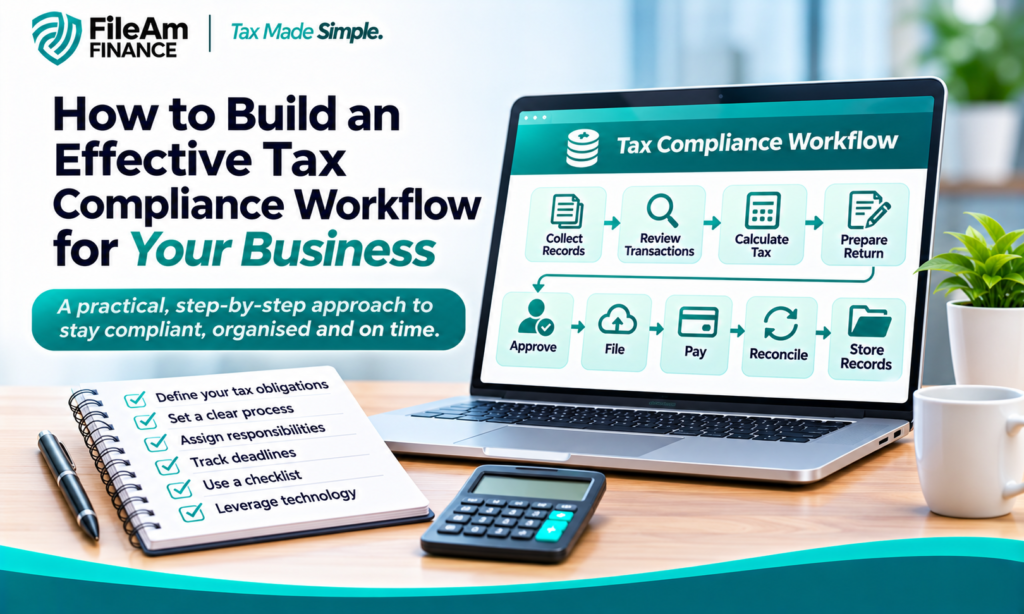
For example, a basic workflow could look like this:
Collect records → Review transactions → Calculate tax → Prepare return → Approve → File → Pay → Reconcile → Store records
The exact workflow will depend on the size and nature of the business, as well as the taxes it is responsible for.
For a Nigerian business, for instance, the workflow may involve obligations such as Company Income Tax, Value Added Tax, Withholding Tax, PAYE and other applicable taxes. Businesses should always confirm the specific obligations and deadlines that apply to them with the relevant tax authority or a qualified tax professional.
The important point is that the workflow should make compliance repeatable rather than dependent on memory.
Why Does Your Business Need a Tax Compliance Process?
Tax compliance can become complicated when businesses rely on spreadsheets, emails, paper documents or individual employees to remember what needs to be done.
A formal tax compliance process provides structure and accountability.
1. It reduces missed deadlines
Tax obligations often have specific filing and payment dates. A workflow allows businesses to record these dates in advance and assign responsibility for each task.
Instead of discovering that a return is due tomorrow, the finance team can receive reminders and begin preparing the required information earlier.
2. It reduces manual errors
Errors can occur when financial information is entered repeatedly into different spreadsheets or systems.
A well-designed workflow introduces review and approval stages before a return is submitted.
3. It creates accountability
Every task should have an owner.
For example:
- The accounts officer collects transaction records.
- The tax officer reviews tax calculations.
- The finance manager approves the return.
- An authorised employee completes the filing and payment.
- The compliance team verifies that evidence has been stored.
This makes it easier to identify where a problem occurred.
4. It makes audits easier
Tax authorities or auditors may request supporting documentation for transactions, deductions, payments or tax returns.
A structured workflow ensures that relevant documents are stored as part of the compliance process rather than searched for months later.
5. It supports business growth
A tax process that works for a small business with a handful of transactions may become inefficient when the business expands.
Creating a workflow early gives the company a framework that can be improved and automated as transaction volumes increase.
How to Build an Effective Tax Compliance Workflow
Building a tax workflow does not necessarily require expensive technology. The first step is understanding the process and then identifying where technology can improve it.
Step 1: Identify All Your Business Tax Obligations
Before creating a workflow, determine which taxes and reporting requirements apply to the business.
This may depend on factors such as:
- Business structure
- Industry
- Turnover
- Employees
- Type of customers
- Type of suppliers
- Nature of transactions
- Location
- Cross-border activities
For example, a company with employees may have payroll-related tax responsibilities, while a company making payments to certain vendors may have Withholding Tax obligations.
Create a master list of these obligations and review it periodically because tax laws and administrative requirements can change.
Step 2: Create a Tax Compliance Calendar
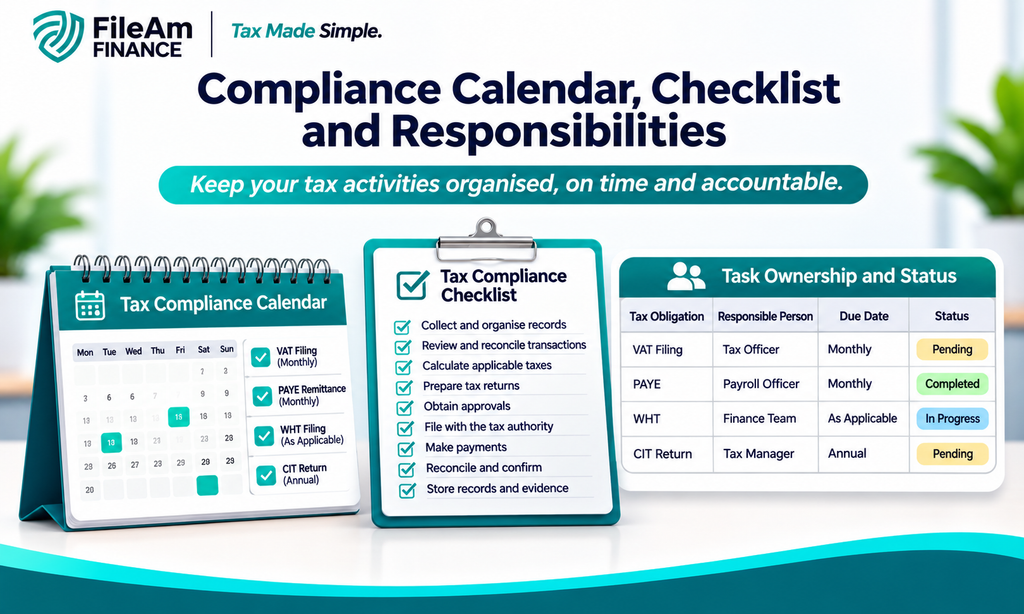
Once obligations have been identified, create a central compliance calendar.
The calendar should include:
| Tax obligation | Reporting period | Due date | Responsible person | Status |
|---|---|---|---|---|
| Tax filing | Monthly/Annual | Relevant deadline | Tax officer | Pending |
| PAYE | Monthly | Relevant deadline | Payroll officer | Completed |
| WHT | As applicable | Relevant deadline | Finance team | In progress |
| VAT | Monthly | Relevant deadline | Tax officer | Pending |
The exact deadlines should be verified against current requirements rather than copied from an old calendar.
A digital calendar can also be configured to send reminders before deadlines.
Step 3: Build a Tax Compliance Checklist
A tax compliance checklist turns the workflow into a practical set of actions.
For each tax obligation, consider including the following:
- Identify the reporting period.
- Gather relevant financial records.
- Check invoices and receipts.
- Review taxable transactions.
- Calculate the tax liability.
- Review deductions or exemptions where applicable.
- Prepare the relevant return.
- Conduct an internal review.
- Obtain approval.
- Submit the return.
- Make the required payment.
- Reconcile the payment with accounting records.
- Save confirmation and supporting documents.
The checklist should be specific enough that another employee could follow it without relying on verbal instructions.
Step 4: Assign Responsibilities
One of the most common weaknesses in tax management is unclear ownership.
A workflow should answer a simple question:
Who is responsible for each stage?
You can use a responsibility matrix to make this clear.
For example:
Finance Officer: Collects financial information.
Tax Officer: Prepares tax calculations and returns.
Finance Manager: Reviews and approves submissions.
Authorised Signatory: Approves payments where required.
Compliance Officer: Confirms that filing evidence has been retained.
Small businesses may have one person performing several roles. That is acceptable, but the responsibilities should still be clearly documented.
Step 5: Standardise Your Tax Data
A tax workflow is only as reliable as the information entering it.
Businesses should establish consistent procedures for recording:
- Sales
- Purchases
- Expenses
- Payroll
- Vendor payments
- Customer payments
- Tax deductions
- Tax payments
- Invoices
- Receipts
It is also important to keep tax-related information connected to the underlying transactions.
For example, when WHT is deducted from a supplier payment, the business should maintain the relevant transaction information and supporting documentation so the deduction can be reconciled later.
Step 6: Introduce Review and Approval Stages
Not every tax return should move directly from preparation to submission.
A review stage provides an opportunity to identify mistakes before filing.
A simple approval workflow could be:
Prepared → Reviewed → Approved → Filed → Paid → Reconciled
The reviewer can check:
- Taxpayer information
- Reporting period
- Taxable amounts
- Calculations
- Supporting documentation
- Previous-period balances
- Payment details
- Filing requirements
This additional review can be particularly valuable when tax information is prepared manually.
Using Tax Workflow Management to Improve Efficiency
Tax workflow management involves organising tax-related activities, responsibilities, documents and deadlines so that compliance can be managed systematically.
Businesses can manage workflows using spreadsheets, accounting systems, dedicated tax software or broader financial management platforms.
The right approach depends on the organisation’s size and complexity.
For a very small business, a spreadsheet combined with a shared calendar may initially be sufficient.
As the business grows, however, it may benefit from software that can provide:
- Automated reminders
- Centralised tax records
- Document storage
- Task assignment
- Approval workflows
- Filing status tracking
- Payment tracking
- Reconciliation
- Reporting
- Audit trails
The goal is not simply to digitise an inefficient process. Businesses should first simplify and standardise the workflow before automating it.
Step 7: Automate Repetitive Tax Tasks
Automation can remove some of the repetitive work involved in tax compliance.
For example, tax software may help businesses organise transaction data, calculate certain tax amounts, generate reports, remind users about deadlines and maintain records of completed tasks.
Automation can also reduce the risk of relying on one employee’s memory.
However, automation does not eliminate the need for human review. Tax rules can be complex, and unusual transactions may require professional interpretation.
A useful principle is:
Automate repetitive tasks, but keep appropriate human oversight for decisions and approvals.
Step 8: Reconcile Tax Records With Your Accounting Records
After filing and payment, do not simply mark the task as complete.
Reconciliation is an important part of the tax compliance workflow.
Compare:
- Tax returns
- Tax payment records
- Accounting records
- Bank statements
- Tax certificates
- Invoices
- Supporting schedules
If the figures do not agree, investigate the difference promptly.
Regular reconciliation can help identify duplicate entries, missing transactions, incorrect tax treatment and recording errors.
Step 9: Store Compliance Evidence Properly
A completed filing is not the end of the workflow.
Businesses should maintain appropriate records showing what was filed, what was paid and how the figures were calculated.
Depending on the obligation, this may include:
- Filed tax returns
- Payment receipts
- Tax certificates
- Invoices
- Receipts
- Payroll records
- Accounting reports
- Reconciliation statements
- Correspondence with tax authorities
Create a logical digital filing structure so documents can be retrieved quickly.
For example:
Tax Records → 2026 → VAT → January → Return + Payment Evidence
This is much easier to manage than having tax documents scattered across individual email accounts and personal computers.
Step 10: Review and Improve the Workflow
A tax workflow should not remain unchanged forever.
At the end of each reporting cycle, ask:
- Was the filing completed on time?
- Were there any errors?
- Which documents were difficult to locate?
- Were responsibilities clear?
- Did approval take too long?
- Were reminders received early enough?
- Did the accounting records reconcile with the tax return?
- Which tasks could be automated?
These questions can help identify weaknesses and improve the process over time.
Common Tax Compliance Workflow Mistakes
Even businesses that have a tax process can experience problems if the workflow is poorly designed.
Relying on one employee
If one person is the only individual who understands the tax process, the business may struggle when that person is unavailable.
Document important procedures and create appropriate backup responsibilities.
Waiting until the deadline
Preparing tax information at the last minute increases the likelihood of errors and missed deadlines.
Start collecting information well before the filing date.
Using outdated tax information
Tax rules and administrative procedures can change. Businesses should regularly verify requirements using current official sources or professional tax advice.
Failing to reconcile payments
A business may file a return and make a payment but fail to confirm that the payment was correctly recorded.
Reconciliation should therefore be a formal part of the workflow.
Keeping poor records
Missing invoices, receipts and payment evidence can make it difficult to demonstrate how tax figures were calculated.
Recordkeeping should happen throughout the year, not only when a filing deadline approaches.
A Simple Tax Compliance Checklist for Businesses
Businesses can use the following checklist as a starting point:
Before filing
- Confirm the tax obligation.
- Confirm the reporting period.
- Check the current filing deadline.
- Gather financial records.
- Review invoices and receipts.
- Identify taxable transactions.
- Calculate the relevant tax.
- Check supporting documentation.
Before submission
- Review the return.
- Verify taxpayer information.
- Check calculations.
- Obtain required approval.
- Submit through the appropriate channel.
After submission
- Make the required payment.
- Save filing confirmation.
- Save payment evidence.
- Reconcile the tax payment.
- Update the compliance calendar.
- Archive supporting documents.
This simple checklist can become the foundation of a more sophisticated digital tax workflow as the business grows.
How Tax Software Can Support Your Workflow
A well-designed tax management system can bring different parts of the compliance process together.
Instead of maintaining separate spreadsheets for deadlines, calculations, documents and payments, businesses can use technology to centralise information and track tasks.
For SMEs in particular, tax workflow management software can help create visibility over outstanding compliance activities.
Useful features may include automated reminders, document management, reporting dashboards, approval controls and integration with accounting systems.
The biggest benefit is often not automation itself, but visibility. Business owners and finance managers can see what has been completed, what is pending and what requires attention.
Final Thoughts
An effective tax compliance workflow gives a business a repeatable system for managing its tax responsibilities. Rather than treating tax as a last-minute finance task, the business can make compliance part of its regular operating process.
The foundation is straightforward: identify tax obligations, create a compliance calendar, assign responsibilities, standardise records, introduce review stages, reconcile payments and retain documentation.
As the business grows, technology can take the process further through reminders, automated calculations, digital records, approval workflows and reporting.
The most important thing is to build the process around the business’s actual tax obligations and keep it updated when tax rules or administrative requirements change. A strong workflow does not just help a business meet deadlines; it creates a clearer, more accountable and more manageable approach to tax compliance.